
Best Timeline Creators in 2026
You're looking for timeline software. The search results are a wall of "Top 10 Best Timeline Makers 2026!!!" lists that all say the same thing.
This isn't that.
Different tools solve different problems. Some are design suites with timeline templates. Some are project-management add-ins. Some exist only to turn dates into a proportional axis. Picking the wrong one wastes an afternoon.
Pricing changes — verify on each vendor's site before you buy. Figures below were checked in August 2026.
Quick comparison
| Tool | Best for | Free option | Account required | Timeline-specific | Export (typical) |
|---|---|---|---|---|---|
| Simple Timeline Maker | Fast milestone visuals from a list of events | Yes — generous free tier; Premium for pro exports | No (free tier) | Yes — built for timelines only | PNG; PDF/PPT on Premium |
| Canva | Polished graphics and slide-ready design | Yes, with limits | Yes (free tier) | Templates, manual layout | PNG, PDF, PPT |
| Preceden | Date-accurate proportional timelines | Yes — 10 events per timeline | Yes | Yes | PNG; PDF on paid |
| Office Timeline | PowerPoint/Gantt-style project slides | Yes — 10 items, limited export online | Yes | Yes — project-focused | PPT; PNG on paid |
| Miro | Team whiteboarding and workshops | Yes — limited boards | Yes | Timeline templates on a canvas | PNG, PDF |
| Lucidchart | Diagrams and flowcharts (timelines as one diagram type) | Yes — limited objects | Yes | Partial — general diagramming | PNG, PDF |
| SmartDraw | Broad diagramming (org charts, floor plans, timelines) | Trial only | Yes | Partial — among many diagram types | PNG, PDF, Office |
| Visme | Presentations and infographics | Yes — limited projects | Yes | Templates, manual layout | PNG, PDF |
Try it before you read the rest
Build a timeline free in your browser — no account, no credit card.
Create a free timelineSimple Timeline Maker
Best for: You have a list of dates and milestones and want a clean timeline in minutes — without learning a full design or diagramming app.
I built this, so I'll be direct about what it does and doesn't do.
Strengths:
- No account required
- Enter events → timeline lays out automatically (no dragging boxes)
- Six visual styles, switch instantly
- CSV import for bulk events
- PNG export, no watermark on free exports
- Handles BCE dates, ranges, and free-form period labels
- Sequence mode for undated steps (story beats, processes)
- Lanes style for parallel history tracks (Rome vs China, Politics vs Science)
- Auto-layout with pagination for 50–100+ events
- Paste events from bullets or spreadsheet rows (no AI required)
- Same-date events grouped on one row with wrapping labels
Limitations (tested, September 2026):
- Free tier: PNG export per preview page (no watermark)
- PDF, PowerPoint, full-page export, branding, and cloud saves require Premium (£12.99 one-time)
- No real-time collaboration
- CSV import capped at 200 rows / 1 MB per file
- Free tier uses browser storage — clearing browser data loses unsaved work
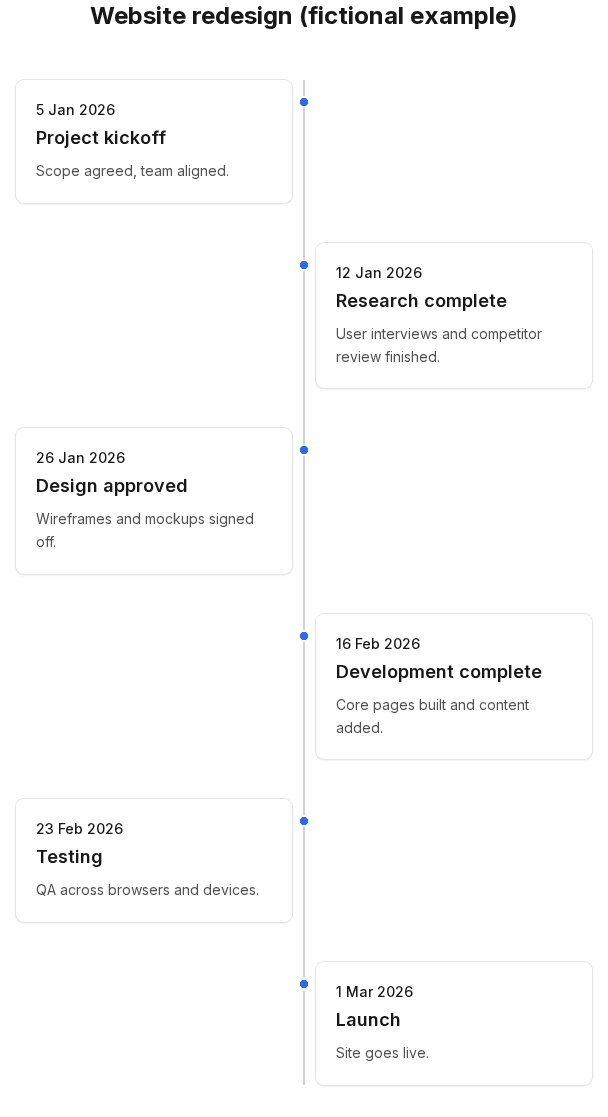
Pricing: Free to build and export PNGs. Premium is £12.99 once for slide-ready PDF/PPT, branding, and cloud timelines.
Deep dive: Why timeline makers break at 20 events — the pain points we built around.
Choose this if: You need a milestone timeline for a slide, doc, or poster and don't want to position elements manually.
Don't choose this if: You need Gantt dependencies, team task management, or PowerPoint-native editing.
Canva
Best for: Design-heavy visuals where the timeline is one part of a broader branded layout.
Canva has timeline templates. You drag elements, change fonts, add illustrations. The result can look excellent — because it's a design tool.
Strengths: Huge template library, easy for non-designers, exports to many formats, real-time collaboration on paid plans.
Weaknesses for timelines: Manual positioning. Adding events means duplicating and moving elements. Not ideal for 20+ dated events that need reordering.
Pricing: Free tier available; Pro around $120/year (verify on Canva).
Choose Canva if: You want a highly styled infographic and don't mind manual layout.
Preceden
Best for: Timelines where proportional date spacing matters — history spanning centuries, or projects where the gap between March and September should look smaller than March to next March.
Preceden is timeline-specific. Events sit on a real time axis.
Strengths: Proper date scaling, multiple layers, spreadsheet import, PDF/PPT export on paid plans.
Weaknesses: Free plan limited to 10 events per timeline (per Preceden's pricing page). Requires an account.
Pricing: Free with 10-event limit; paid from about $10/month billed annually (August 2026).
Choose Preceden if: Date-accurate spacing is non-negotiable and you're okay with account signup (and possibly paying for more than 10 events).
Office Timeline
Best for: Project managers who live in PowerPoint and want Gantt-style slides with swimlanes, dependencies, and MS Project/Excel import.
This is the most "project management" tool on this list.
Strengths: Deep PowerPoint integration (Windows add-in), Gantt features, imports from Excel/Project/Jira on higher tiers.
Weaknesses: Free online tier limited to 10 items with export restrictions (per Office Timeline support docs). Desktop add-in is Windows-only. Paid plans from roughly $108/year upward.
Choose Office Timeline if: You're building executive project slides inside PowerPoint and need Gantt features.
Don't choose it if: You just want six milestones on a slide without installing an add-in.
Miro
Best for: Collaborative workshops where a timeline is drawn on a shared whiteboard.
Strengths: Excellent real-time collaboration, infinite canvas, good for brainstorming.
Weaknesses: Timelines are manual — sticky notes on a line. Fine for workshops, awkward for a polished one-off deliverable.
Pricing: Free tier with limited boards; paid team plans (verify on Miro).
Choose Miro if: The team is already whiteboarding together and the timeline is a working document, not a final export.
Lucidchart & SmartDraw
Best for: Organisations already using them for flowcharts, org charts, and process diagrams.
Both can make timelines, but timelines aren't the centre of the product. You're in a general diagramming workflow — great if you need ten diagram types, overkill if you need one timeline.
SmartDraw: Trial-based; paid subscriptions (verify current pricing).
Lucidchart: Free tier with object limits; paid for teams.
Choose these if: You already pay for diagramming and want everything in one toolchain.
Visme
Best for: Infographics and presentations with strong visual design, similar to Canva.
Timeline templates exist. Layout is manual. Good for one-off polished graphics, less good for iterating on twenty milestones weekly.
How to choose
Ask yourself:
-
Do I have the dates already, or am I still figuring them out?
→ If ready: timeline maker or Preceden. If brainstorming: Miro. -
Is this for a PowerPoint deck about a complex project?
→ Office Timeline or Canva. -
Do I need proportional historical spacing?
→ Preceden. -
Do I just need six milestones on a slide by tomorrow?
→ Simple Timeline Maker or Canva. -
Do I need task assignments and dependencies?
→ None of these alone — use a PM tool, then export milestones to a timeline.
The honest summary
| If you need… | Consider… |
|---|---|
| Fast milestone timeline, no account | Simple Timeline Maker |
| Beautiful branded design | Canva or Visme |
| Date-proportional axis | Preceden |
| PowerPoint Gantt slides | Office Timeline |
| Team whiteboard session | Miro |
| Diagramming suite | Lucidchart or SmartDraw |
No single tool wins every category. That's the point.
Learn more
Create a timeline in Simple Timeline Maker — free, no account, see if it fits your job before paying for anything else.